
HubSpot vs Pipedrive: Which CRM Fits Your Small Business in 2026?


For a small team that wants to start free and see emails appear in deal records without extra setup, HubSpot is the better fit. For a team that lives in its sales pipeline and wants ready-made automation templates and a color-coded board, Pipedrive is the stronger choice. The decision changes if you need multi-step automation: simple stage-change rules are available on HubSpot Starter and Pipedrive Growth, but full Workflows in HubSpot start at Professional—and that difference affects your budget more than usability.
Who this comparison is for
This HubSpot vs Pipedrive comparison is for small business owners and managers at small agencies where one to five people handle sales. You already know what a pipeline and a task are, and you are picking a system for the next year or two. If you need a CRM for a department with dozens of reps, complex roles and reporting, this is not the right comparison for you. And if you have not yet decided whether you need a CRM at all, start with Why Small Businesses Need a CRM.
How we evaluated them
We set up the same data in both CRMs: a five-stage pipeline (New inquiry, First conversation, Brief agreed, Proposal sent, Payment) and five deals with test contacts. The tasks had different due dates: one due today, one overdue, one due in three days, and two deals had no task at all. We used both in the English interface and connected both to the same Gmail inbox. Then we checked three things that affect daily work, not just what looks good on a features page:
- Whether emails appear in deal records automatically, and what you have to do to make that happen.
- What the main screen shows in the morning when some deals have a task due today, some are overdue and a few have no task at all.
- How much effort it takes to set up the same rule: when a deal moves to “Proposal sent”, a task should be created with a due date three days later, assigned to the deal owner and linked to the deal.
The criteria are the same for both: fit for the job, ease of use, price by plan, integrations, limits. Prices, plan features and limits are based on vendor documentation and pricing pages, with the date we checked them.
The two tools in brief
HubSpot is a CRM with a free plan that sits inside a broader platform (marketing, service, content). For sales, it offers contact, company and deal records, a pipeline, tasks and an activity timeline. Pipedrive is a CRM built around a visual sales pipeline: the central screen is a board of deals, with activities, email and automations around it. For more on each, see our reviews: HubSpot Review and Pipedrive Review.
HubSpot vs Pipedrive: feature comparison
| Criterion | HubSpot | Pipedrive |
|---|---|---|
| Gmail connection | One step; emails started logging automatically | Two steps: connect the account, then a separate “Start sync” |
| Email visibility choice | No per-inbox option; account settings only control which emails get logged (default “Log all emails from known contacts”) | Shared or Private when starting sync (Private by default) |
| Emails sent before connecting | Per the note in settings, logging rules apply only to new emails | Emails from the previous 3 days (the default) were added during sync |
| “No next step” signal on the board | Yellow “No upcoming” label | Yellow warning on the card |
| Overdue signal on the board | Time label such as “a day ago” | Red marker |
| Where the “task on stage change” rule is set up | In pipeline settings (Automate tab), in the column for the stage | Ready-made template “Schedule follow-ups when deals move stage” in Automations |
| What the automatic task is linked to | The deal that triggered the rule | The deal and the contact |
| Assignee of the automatic task | Must be chosen (“An existing owner of the deal”; default is “No one”) | Deal owner |
| Whose action triggers the rule | A stage change by any user | By default, only a stage change by the rule’s creator; other users must be added in “Manage users” |
Email in the deal record
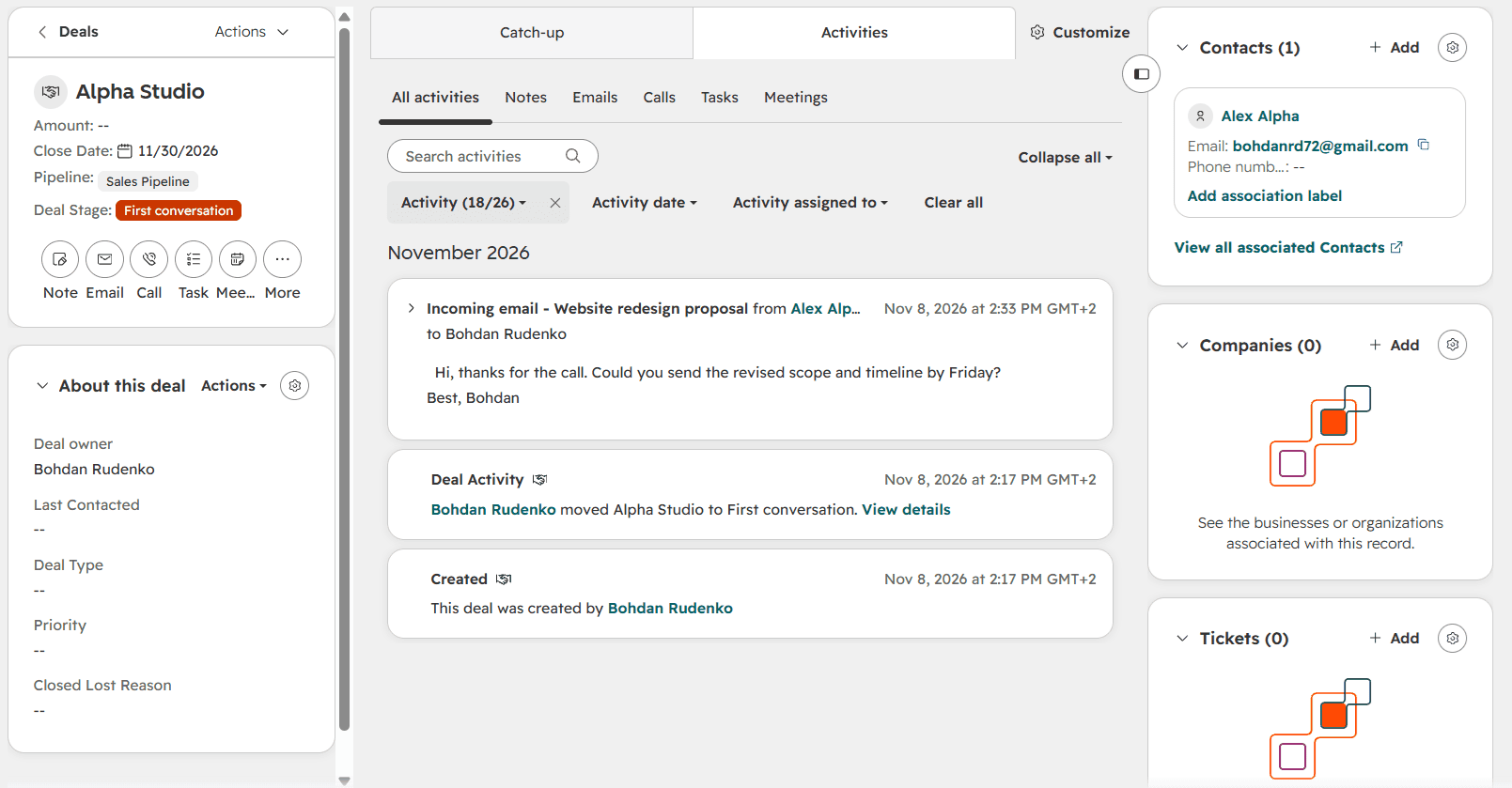
In HubSpot, the Inbox automation toggle was off, yet an email sent from the test address appeared on the contact and deal timelines in under a minute. During connection, Google asks for view and send permissions separately. Email control works differently from Pipedrive. We found no “private or shared” choice for the inbox; account settings hold only a logging rule (by default, HubSpot logs all emails from known contacts). The note above that section says the rule applies only to new emails, so HubSpot will not add earlier correspondence on its own.
Pipedrive’s path is longer but more configurable: after you connect the account, a separate “Start sync” step lets you choose a personal or team account, email visibility (Shared or Private), how far back to sync (3 days by default) and which folders to include. As soon as we started the sync, an earlier email appeared in the deal history and an email icon appeared on the board card. For teams, this visibility setting matters: emails are private by default, so a colleague will not see the thread until you change that.

How each CRM shows the next step
Both CRMs show the next step right on the deal card on the board, and both highlight deals with no task in yellow, making them easier to spot. The difference is how the signals are presented. Pipedrive uses colored icons (green for today, red for overdue, gray for later, a yellow warning when there is no task), so you can scan the board at a glance without reading any text. HubSpot displays text on the card (“No upcoming”, “in 3 days”, “a day ago”), which is more precise but requires more attention when there are many cards. We looked at five deals; on a large pipeline, the impression may be different.


Automation: stage change to task
The rule was identical: when a deal moves to “Proposal sent”, a “Follow up on proposal” task should be created with a due date three days later, assigned to the deal owner and linked to the deal.
In Pipedrive, setup took about a minute: the Automations section has a ready-made template, “Schedule follow-ups when deals move stage”, where you choose the stage, activity type, title and due date (“In 3 days”). After the deal moved to “Proposal sent”, the task appeared immediately, due on 11 November, assigned to the deal owner and linked to both the deal and the contact automatically. A new automation is marked “Private, triggered by you only”: the rule fires only when its creator moves a deal. To make it work for the team, add other users in “Manage users”; the creator and users with global admin permissions can edit the rule.

In HubSpot, the simplest way to set up this rule is through the pipeline settings. On the Automate tab, each stage has its own column. In the “Proposal sent” column, add a “Create task” action. The rule goes live immediately, with no separate review wizard. After the deal moved to “Proposal sent”, the task appeared within 20-30 seconds, due on 11 November, assigned to the deal owner and linked to the deal. There are more settings than in Pipedrive, and each one is worth checking:
- the assignee defaults to “No one”, so you must select the deal owner explicitly;
- “Business days only” is on by default: unless you turn it off, “in 3 days” will mean three business days;
- the time of day follows the account time zone, not yours: our task was due at 8:00 AM UTC-5, which appeared as 3:00 PM in Kyiv.

You can build the same rule in the full Workflows editor, which adds property-change triggers, branches, delays and a four-step review wizard that, among other things, asks whether to enroll deals that already meet the condition. For a single stage-change rule, that is the long way round: the task from that workflow took a minute or two to appear. Workflows make sense when a rule involves several steps or conditions.
Availability: according to HubSpot’s documentation, pipeline automation, including creating a task when a deal enters a stage, is available on Starter and above, while the full Workflows editor starts at Professional (knowledge.hubspot.com, checked 08.11.2026). On the free plan, the Automate tab offers only two templates tied to the deal close date. In Pipedrive, automations are available on Growth and above, and Premium allows up to 150 active ones.
Pricing comparison
Prices are per seat per month in US dollars, checked 10.11.2026. HubSpot prices are for Sales Hub. Both companies periodically change their promotions and regional pricing, so confirm prices on their websites before buying.
| Plan | HubSpot | Pipedrive |
|---|---|---|
| Free | Yes (Free) | No |
| Entry | Starter: regular price about $20; a limited-time offer for new customers is currently $7 billed annually | Lite: $14 billed annually, $24 billed monthly |
| Mid | Professional: $90 billed annually, $100 billed monthly, plus mandatory paid onboarding (about $1,500) | Growth: $39 billed annually, $49 billed monthly |
| Upper | Enterprise: $150, plus mandatory paid onboarding (about $3,500) | Premium: $59 / $79; Ultimate: $79 / $99 |
For a team of three, HubSpot Starter costs about $60 a month at the regular price, or about $21 per month with the annual promotion. Pipedrive Growth billed annually comes to about $117 a month. Both plans support a simple stage-change rule like the one we tested. The gap opens up as rules and conditions multiply: in HubSpot, full Workflows start at Professional, which for the same three people is about $270 a month plus the one-time onboarding fee. In Pipedrive, multi-step automation is available on Growth and Premium.
On the other hand, HubSpot Free gives you a pipeline, deals and automatic email logging at no cost. Pipedrive has no free plan, so of the two, only HubSpot offers a permanent free option, though with one pipeline and almost no automation (only two templates tied to the close date).
Integrations
In the context of the R StackAI ecosystem, what matters most is how a CRM connects to automation and AI. We have used both CRMs in our stacks: AI Customer Support Agent Stack and AI Lead Scoring Stack. We successfully connected Pipedrive to n8n using an API token. In two separate tests, the OAuth connection returned a 403 “Scope and URL mismatch” error, and we did not establish the cause. We did not connect HubSpot to n8n ourselves, so we draw no conclusions about that integration. Both CRMs connected to Gmail without problems, as described above.
If you plan to integrate the CRM with n8n or another automation tool, test the connection on your plan before moving your customers in.
When to choose HubSpot
HubSpot fits if you are starting from scratch and want to begin on the free plan, if you want emails to appear in records with no extra setup, or if the CRM is just a first step and you may later need marketing or customer support tools on the same platform. Stage-change rules are already available on Starter. It fits less well if you need multi-step automation on a small budget: Workflows start at Professional, and the price gap between Starter and Professional is large. The free plan also has only one pipeline.
If you have already chosen HubSpot, the guide How to Set Up Your First CRM Pipeline in HubSpot walks you through the first pipeline.
When to choose Pipedrive
Pipedrive fits if you organize sales around your pipeline: you want a board with color signals from day one, a typical rule set up quickly from a ready-made template, and room to build more complex automation without a sharp jump in plan price. It fits less well if you need a free start: there is no free plan. In a team, you also have to set email visibility deliberately and add colleagues to each automation, because emails are private by default and a rule fires only when its creator moves a deal.
Are there better alternatives?
If all you need is a spreadsheet with reminders for 10-20 clients, a full CRM may be overkill: see CRM & Sales Stack for Small Business and How to Set Up Your First CRM Pipeline to work out how much structure you actually need.
Final recommendation
Choose by scenario, not by popularity. If you are starting with no budget, want emails to simply show up in your records and do not need automation yet, go with HubSpot Free; when you need reminders on stage changes, move to Starter. If you sell every day, organize your work around the pipeline and want ready-made automation templates and a clear board right now, go with Pipedrive. And if you already know you will need multi-step automation, first work out the full cost in HubSpot (Professional plus onboarding) and compare it with Pipedrive Growth or Premium for your headcount.
